
Get Your Credentials
Sign up, find your credentials, and make every request authenticate.
1. Create your account
Sign up at displai.transfi.com/auth — company details, email OTP, password, then MFA with an authenticator app. You can start testing immediately; no sales call.
2. Find your credentials
Settings → Integration in the dashboard shows three things:
| What | Where |
|---|---|
| Username | Shown on the Integration tab |
| Password (merchant key) | Click the regenerate icon → Yes, generate → copy it. It is shown once. |
| MID | Your merchant ID, on the same tab |
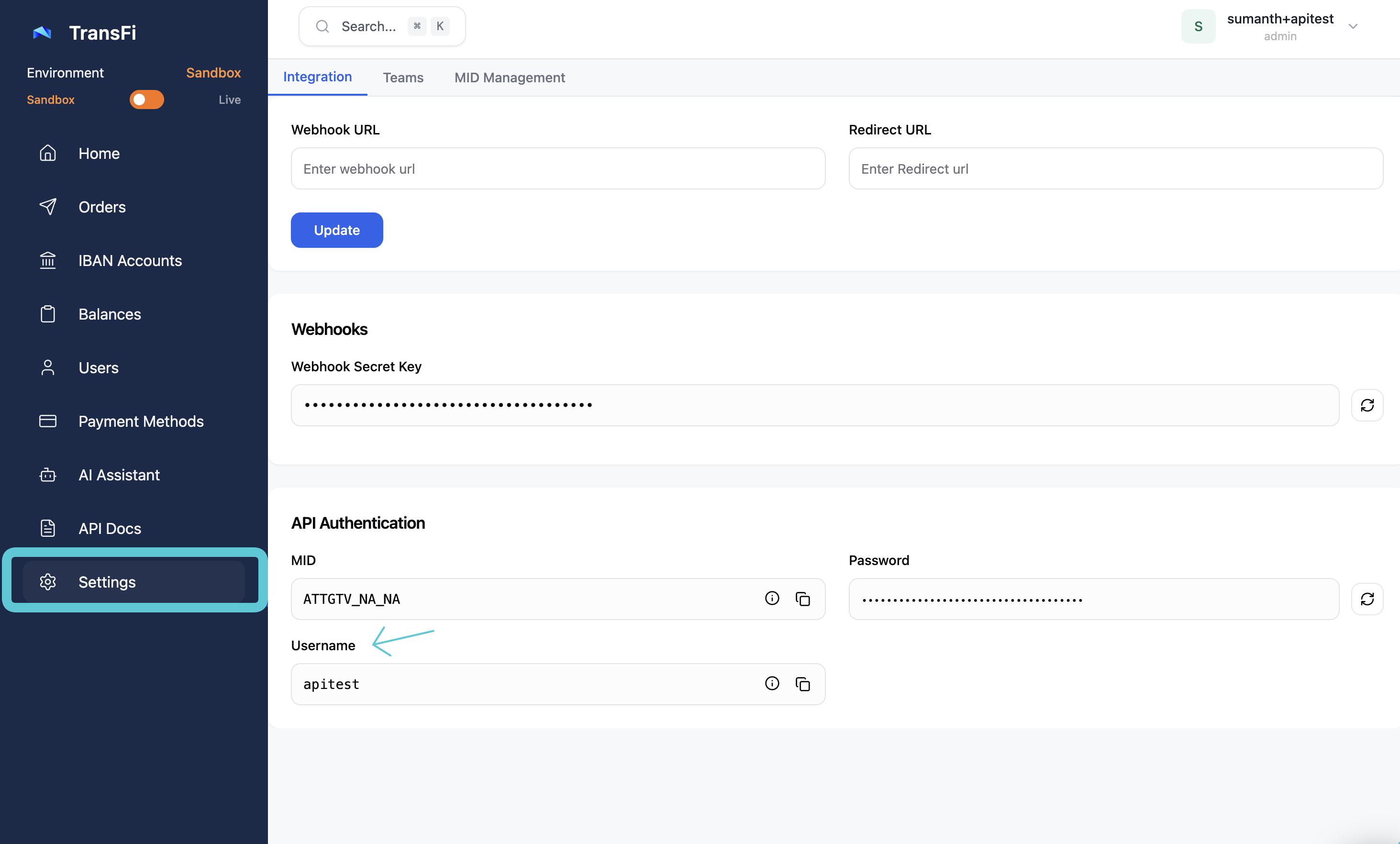
Settings → Integration: username, MID and the password regenerate icon
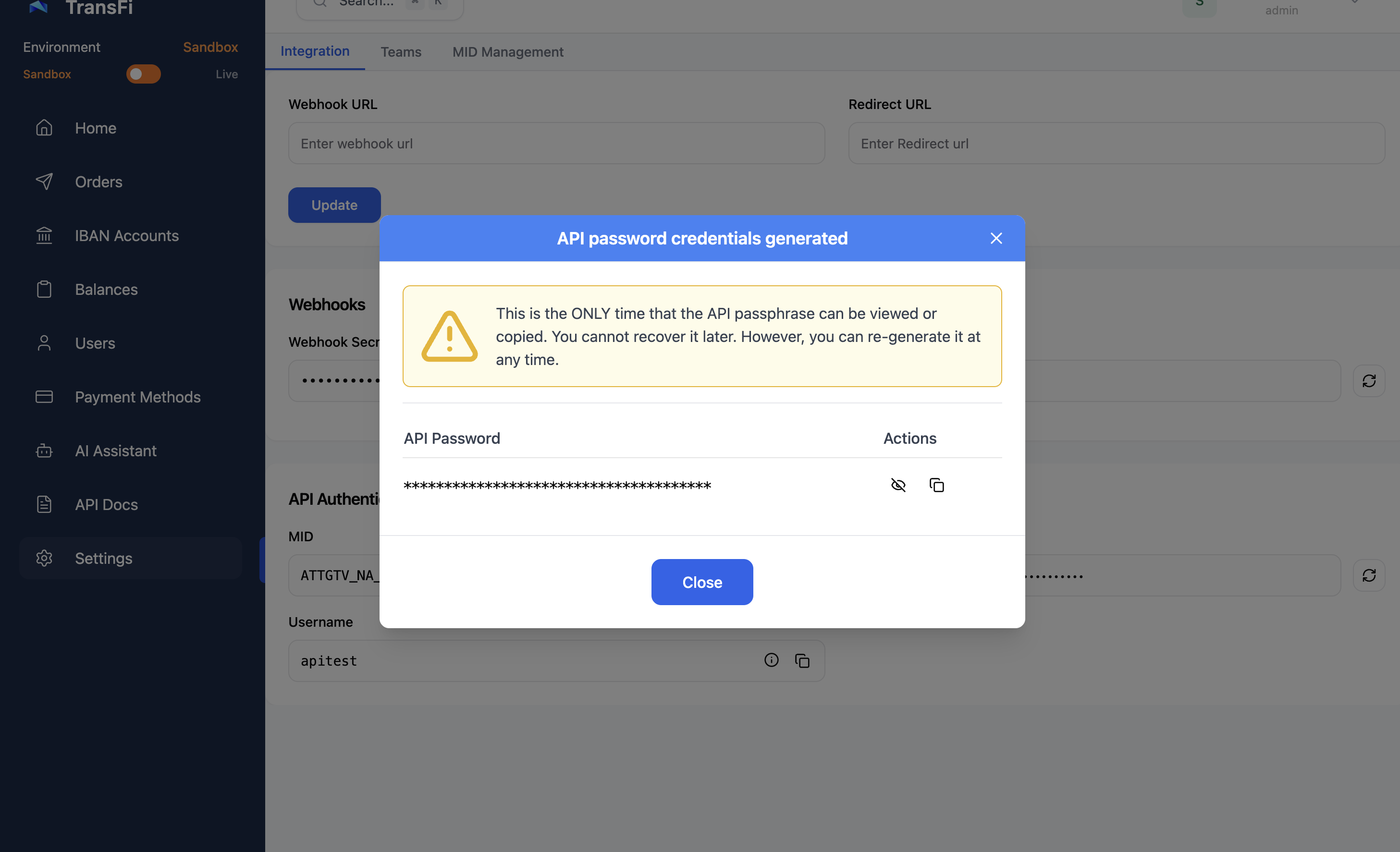
Click regenerate, confirm, then copy the password — it's shown once
Sandbox and production have separate credentials. Store them as environment variables — never in code, frontend JavaScript, mobile bundles or public repositories.
# .env
TRANSFI_USERNAME=your_sandbox_username
TRANSFI_PASSWORD=your_sandbox_password
TRANSFI_MID=your_mid
3. Send them on every request
TransFi uses HTTP Basic authentication plus a mid header.
| Header | Value |
|---|---|
Authorization | Basic + Base64 of username:password |
mid | Your MID. Required on every request. |
Content-Type | application/json when sending a body |
| Environment | Base URL | Real money? | KYB required? |
|---|---|---|---|
| Sandbox | https://sandbox-api.transfi.com | No — use Testing in Sandbox | No |
| Production | https://api.transfi.com | Yes | Yes |
curl 'https://sandbox-api.transfi.com/v3/mids' \
  -u "$TRANSFI_USERNAME:$TRANSFI_PASSWORD" \
-H "mid: $TRANSFI_MID"const credentials = Buffer.from(`${process.env.TRANSFI_USERNAME}:${process.env.TRANSFI_PASSWORD}`).toString('base64');
const headers = {
'Authorization': `Basic ${credentials}`,
'mid': process.env.TRANSFI_MID,
'Content-Type': 'application/json'
};import base64, os
credentials = base64.b64encode(f"{os.getenv('TRANSFI_USERNAME')}:{os.getenv('TRANSFI_PASSWORD')}".encode()).decode()
headers = {
'Authorization': f'Basic {credentials}',
'mid': os.getenv('TRANSFI_MID'),
'Content-Type': 'application/json'
}If the call returns your MIDs, you're authenticated. 401 means the encoding is wrong or the credentials aren't active yet; UNAUTHORIZED_CUSTOMER means the mid header is missing or wrong.
A missingmidheader is the most common first-call failure. It isn't inferred from your credentials.
More than one MID? Balances, orders and settings are scoped to themidyou send. See List MIDs.
Updated 22 minutes ago